
SD-Access Advanced: Multisite Fabric Lab
Take your SD-Access skills beyond a single fabric site. Build a three-site SD-Access deployment combining classic LISP/BGP, LISP Pub/Sub, and Fabric-in-a-Box with multisite transit, a dedicated IoT virtual network, and dynamic ISE endpoint onboarding.
The launch will be soonCourse Highlights
Three-Site Architecture
Deploy and interconnect three distinct fabric sites: classic LISP/BGP, modern LISP Pub/Sub, and a compact Fabric-in-a-Box (FIAB) topology.
Multi-VN & IoT Design
Implement dedicated Campus_VN and IoT_VN virtual networks to configure strict macro and micro-segmentation across the entire fabric.
Advanced Onboarding
Master user-based 802.1X, certificate-based 802.1X, and MAB authentication workflows through Cisco ISE for diverse endpoint types.
Multisite Transit & Fusion
Configure multisite IP-based transit, BGP peering, Fabric Zone transits, and route leaking between VRFs and the Global Routing Table (GRT).
TrustSec & GBAC Policies
Set up TrustSec integration, dynamic Security Group Tag (SGT) assignments, and validate Group-Based Access Control policies across sites.
Operational Validation
Validate end-to-end LISP registrations, endpoint learning, Anycast Gateways, Layer 3 handoffs, and data plane enforcement.
Advanced Multisite Experience
Designed for CCIE Enterprise Infrastructure candidates and engineers who already have single-site SD-Access experience and are ready for multisite, multi-VN designs.
Gain intensive, hands-on practice covering the advanced fabric, transit, and policy scenarios found directly on the Cisco CCIE Enterprise Infrastructure lab blueprint.
- Multi-Topology Control Planes: Direct exposure to classic LISP/BGP, LISP Pub/Sub, and FIAB topologies.
- Complete Endpoint Workflows: Compare user-802.1X, cert-802.1X, and MAB onboarding against real Cisco ISE policies.
- Cross-Site Policy Enforcement: Enforce and verify SGT segmentation and external connectivity through Fusion routers.
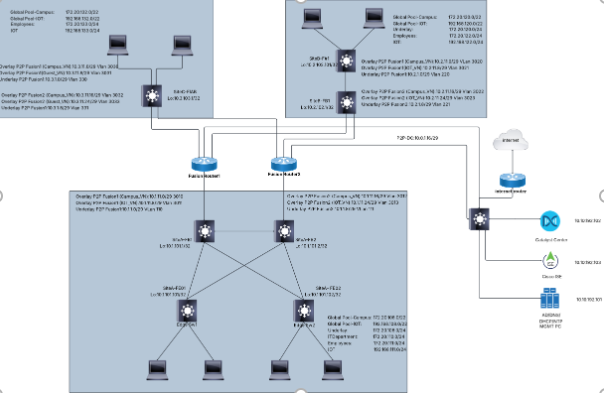
Technologies Covered
- ✓ Classic LISP/BGP & LISP Pub/Sub Control Planes
- ✓ Fabric-in-a-Box (FIAB) Site Deployment
- ✓ Multisite IP-Based Transit & Fabric Zone Transits
- ✓ Campus_VN & IoT_VN Virtual Networks
- ✓ IS-IS & OSPF Fabric Underlay Routing
- ✓ Fusion Router BGP & VRF Route Leaking
- ✓ User-Based & Certificate-Based 802.1X
- ✓ MAC Authentication Bypass (MAB) for IoT
- ✓ Cisco ISE TrustSec Integration & SGT Mapping
- ✓ Group-Based Access Control (GBAC) Policies
Modules & Topics
- Integrate Cisco Catalyst Center with Cisco ISE
- Integrate Cisco ISE with Active Directory
- Configure Site Hierarchy
- Configure Global Network Settings
- Configure Discovery Credentials
- Configure Global IP Pools
- Prepare Cisco ISE policies for device admin authentication
- Configure BGP connectivity between DC-CoreSW1 and Fusion routers
- Configure Internet edge connectivity
- Validate datacenter reachability from Fusion routers
- Create the Campus_VN VRF
- Create the IoT_VN VRF
- Configure underlay interfaces
- Configure overlay transit interfaces
- Configure underlay BGP
- Configure overlay BGP
- Configure route leaking between the GRT and VRFs
- Validate Fusion router routing
- Configure hostname, domain, local user account, SSH, SNMP, NETCONF
- Configure underlay routed interfaces
- Configure BGP peering with Fusion routers
- Validate underlay reachability
- Site A: Configure IS-IS underlay routing
- Site B: Configure OSPF underlay routing
- Validate fabric underlay connectivity
- Discover Fabric Border and Fabric Edge nodes
- Assign devices to the site hierarchy
- Provision network devices
- Validate device inventory status
- Create the fabric sites
- Configure Anywhere Border nodes
- Assign Border, Control Plane, and Edge node roles
- Configure Site A LISP/BGP fabric control plane
- Configure Site B LISP Pub/Sub fabric control plane
- Site C: Fabric-in-a-Box (FIAB) deployment
- Configure multisite IP-based transit
- Create the Campus_VN virtual network
- Create the IoT_VN virtual network
- Create and reserve fabric IP pools
- Configure Anycast Gateways
- Configure Layer 3 handoff
- Configure fabric zone transits
- Validate multisite fabric provisioning
- Configure TrustSec integration
- Configure Security Groups (SGTs)
- Configure virtual network and scalable group mapping
- Configure endpoint identity groups
- Configure authentication policies
- Configure authorization policies
- Configure user-based 802.1X endpoint authentication for Site A
- Configure certificate-based 802.1X endpoint authentication for Site B
- Configure MAB authentication for IoT endpoints
- Validate dynamic SGT assignment
- Validate fabric policy enforcement
- Validate multisite endpoint connectivity
- Configure Group-Based Access Control (GBAC) policies
- Validate intra-SGT and inter-SGT communication across fabric sites
- Validate external connectivity through Fusion routers
- Verify SGT-based policy enforcement across the multisite fabric
- Validate LISP registration and endpoint learning across fabric sites
- Validate segmentation policy enforcement across virtual networks and scalable groups
- Validate fabric control plane and data plane operations
Start Your Lab Experience
Lab Hours Booking
Reserve access to a dedicated, pre-wired lab environment and use your purchased lab hours whenever it suits you.
- Direct access via browser and internet connection
- Dedicated Catalyst Center and ISE controllers
- Full control over single fabric site & underlay
- Zero hardware required on your side
- Schedule your lab session for any available date and time